
Fill it. Check it. Fix it. File it.
FormVeritas is a quality-control step between "I think it's done" and "filed." It checks your answers the way a careful reviewer would, and tells you exactly what to look at again.
Create an account
Free, with 1 audit. No card needed.
Fill in the Workspace
Choose from 121 forms on the current USCIS edition.
Run the audit
Form-specific checks run in seconds.
Fix and export
Correct what's flagged, re-check, export your PDF.
Track your case
Follow USCIS status in the Case Tracker.
See exactly what you'll use.
Real screens from the FormVeritas app, including a real audit report. Names are blurred.
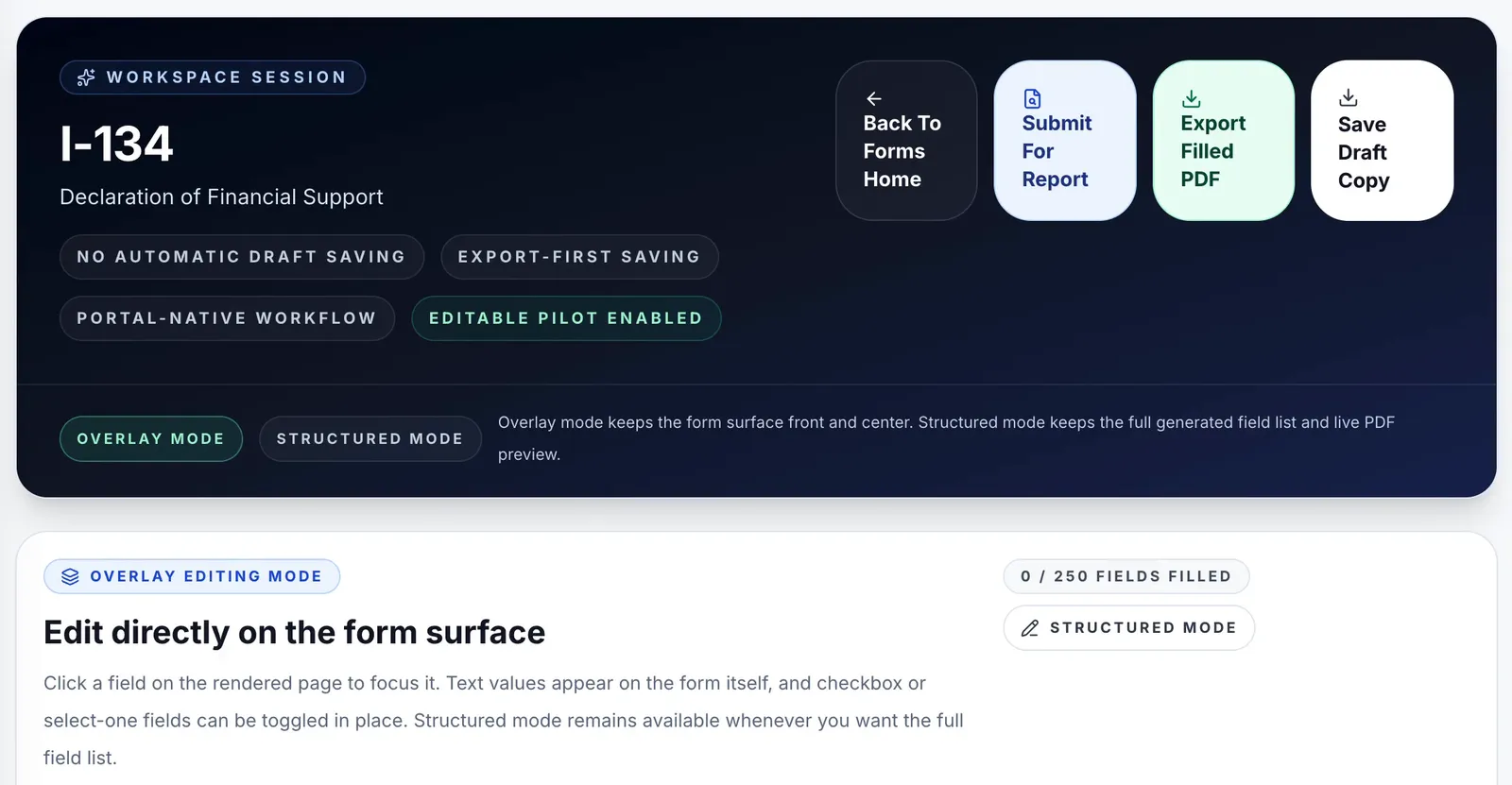
Open a Workspace session
Pick your form and it opens on the edition USCIS accepts. From one place you can submit for a report, export the filled PDF, or save a draft copy to your own device.
- No automatic draft saving: your data stays with you
- Overlay mode to type right on the form, or structured mode for a field list
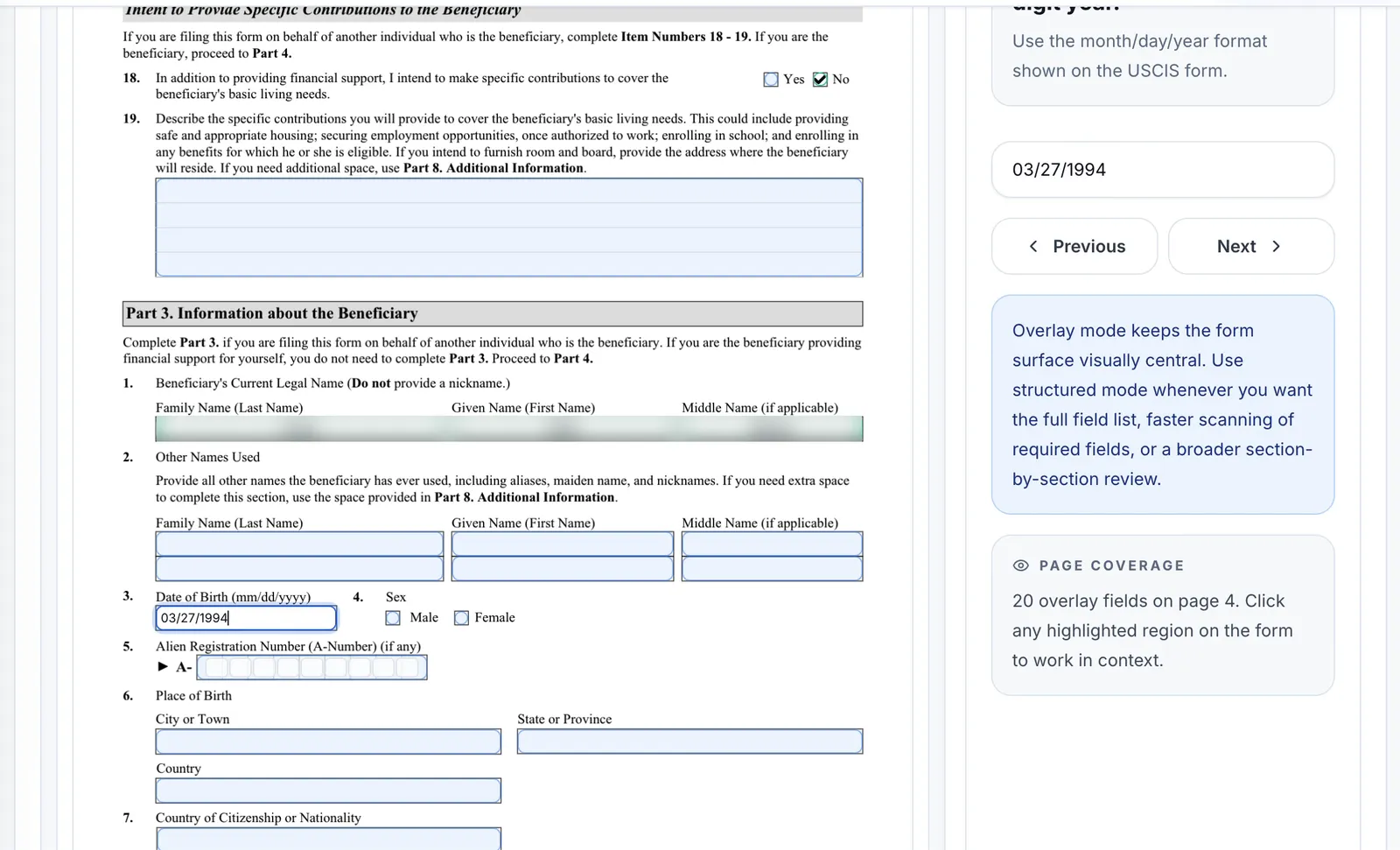
Fill the real form, with guidance beside it
Click any field on the rendered USCIS page and the field inspector explains what it expects, like the month/day/year format for a date, and walks you field by field with Previous and Next.
- Every highlighted box is a field the audit understands
- Page coverage shows how many fields are on each page
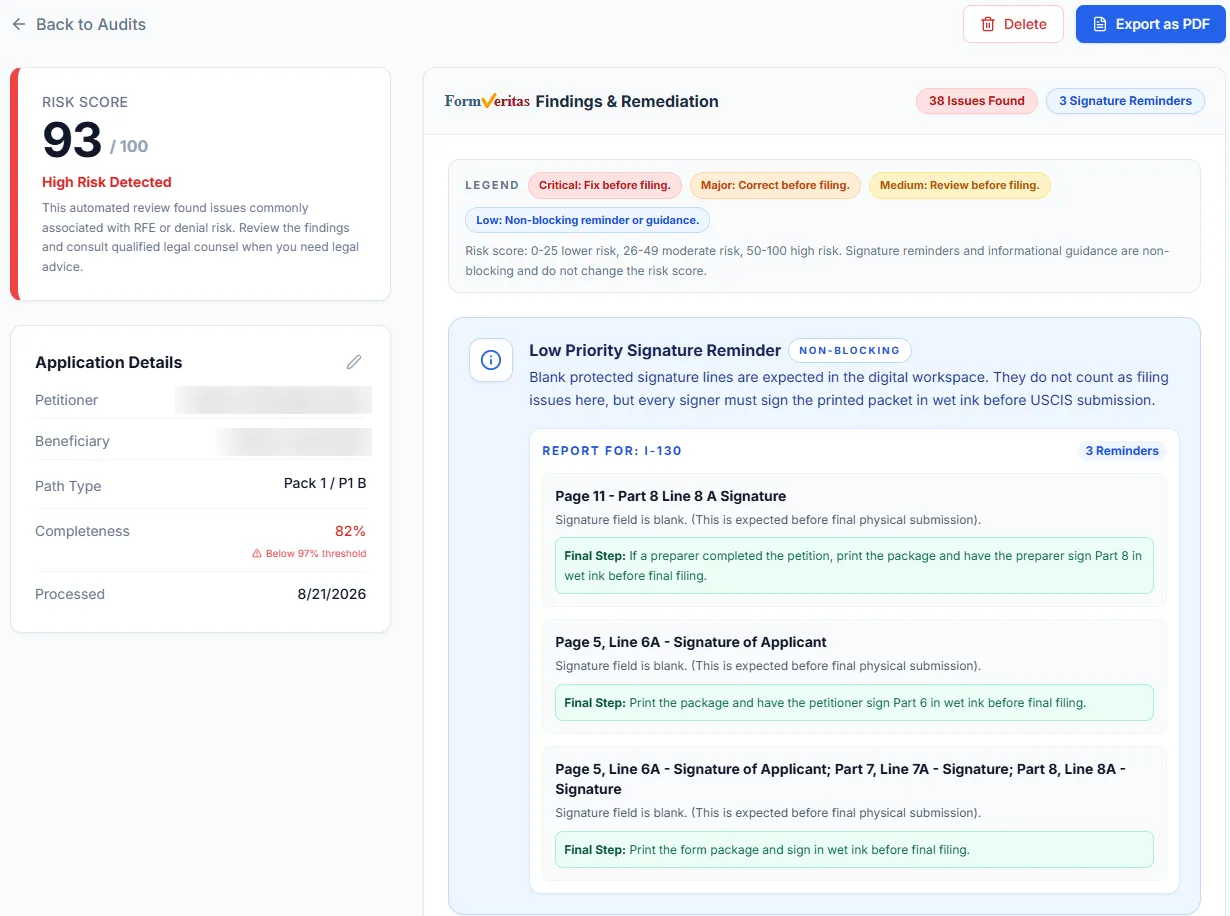
Get a report you can act on
Submit for report and FormVeritas returns a risk score, a completeness percentage and a count of issues, with a legend showing what must be fixed before filing.
- Findings sorted by priority, with blocking issues first
- Page-and-line references such as "Page 8, Line 6"
- Plain-English next steps, like the wet-ink signature reminder
- Export the report as a PDF for your records or your attorney
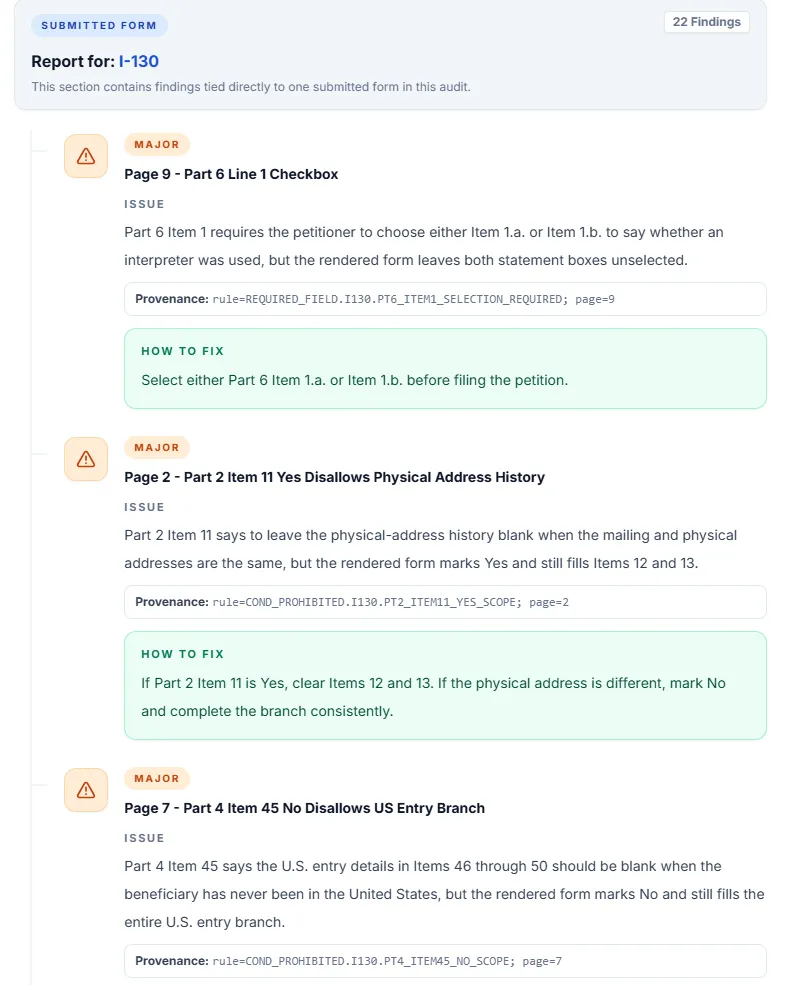
Every finding comes with the fix
Each finding is labelled by severity (Critical, Major, Medium or Low), points to the exact page, part and item, explains the problem in plain English and tells you how to fix it.
- Severity tells you what to fix first: Critical and Major items before you file
- A traceable rule reference on every finding, so reviewers can verify it
- Fix, re-check, and watch the risk score drop
Designed to be used in the Workspace.
FormVeritas audits run on the answers you enter in its Form Workspace. That's by design, and it's what makes the results accurate.
Every check is written for a specific field on the specific USCIS edition the Workspace fills. The engine knows that a field holds an A-Number, a date of birth or a Yes/No answer, and checks it accordingly. It never has to guess what a scanned or flattened document says.
- Accurate by design. Structured, field-level answers, not text pulled from images.
- Current edition. The Workspace fills the edition USCIS accepts and warns you when it changes.
- Desktop or laptop. Built for a full-size browser, where long forms are easiest to complete.
- Export to file. Download your filled PDF when the report is clean.

We don't store your drafts
The Form Workspace doesn't save drafts to your account. You save your work by downloading a draft file to your own device and reopen it whenever you're ready.
When you run an audit, our servers hold your form data in memory only while they build your report. Your data is never used to train machine-learning models, and the audit engine doesn't use one.
Read the Privacy Policy →Six kinds of checks, written for each form.
9,005 rules across 121 forms. The report groups what it found so you can work through it section by section.
Answers left blank
FormVeritas points out blank answers in the places its checks for this form look at.
How entries are written
FormVeritas checks how entries are written against what each field asks for.
Dates
FormVeritas checks the dates entered on this form.
Answers that do not fit together
FormVeritas compares related answers on this form and points out ones that do not fit together.
Check boxes and Yes/No questions
FormVeritas checks how boxes are selected in the groups of choices on this form.
Signatures
FormVeritas checks the signature lines on this form.
After you file, follow every case in one place.
Add your receipt numbers and FormVeritas retrieves status updates from USCIS through the official USCIS Case Status API.
- Every receipt number for a family or a firm's clients side by side
- Status history kept with your account while it's active
- FOIA Request Tool: request your USCIS records through the USCIS FOIA API
How tracker data is handled
To check status, FormVeritas sends your receipt numbers to USCIS. Case tracker and FOIA records stay with your account while it's active, and you can ask us to delete them sooner. See the Privacy Policy.
What FormVeritas does not do
FormVeritas checks the form itself. It does not check that every question that applies to you is answered, whether your answers are true, or whether you are eligible for what you're asking for. A report with no findings does not mean USCIS will accept or approve your filing.
FormVeritas is not a law firm and does not give legal advice. For eligibility questions or case strategy, talk to a licensed immigration attorney or DOJ-accredited representative.
Before USCIS reviews your petition, check it yourself.
One skipped answer. One mismatched date. One missing signature. That is all it can take to slow down an immigration case. Your first audit is free.
Not legal advice. No approval guarantee. A smarter way to catch form mistakes before you file.